드로어의 스타일을 변경하고자 할 때는 다음과 같이 Drawer.Navigator 컴포넌트에 screenOptions Props를 설정하면 됩니다. 이 Props는 화면을 설정할 수 있는데 드로어에 관한 옵션은 drawer로 시작합니다. 다음 값들이 들어있는 객체를 설정하면 됩니다.
• drawerActiveTintColor: 활성화된 항목의 텍스트 색상
• drawerActiveBackgroundColor: 활성화된 항목의 배경색
• drawerInactiveTintColor: 비활성화된 항목의 텍스트 색상
• drawerInactiveBackgroudnColor: 비활성화된 항목의 배경색
• drawerItemStyle: 항목의 스타일
• drawerLabelStyle: 항목 내부의 텍스트 스타일
• drawerContentContainerStyle: 항목들을 감싸고 있는 영역의 스타일
• drawerStyle: 전체 드로어를 감싸고 있는 영역의 스타일
이 Props를 사용해 활성화된 항목의 배경색을 주황색으로 바꿔보겠습니다.
App.js
(...) function () { return ( <NavigationContainer> <Drawer.Navigator initialRouteName="Home" drawerPosition="left" backBehavior="history" screenOptions={{ drawerActiveBackgroundColor: '#fb8c00', drawerActiveTintColor: 'white', }}> <Drawer.Screen name="Home" component={HomeScreen} options={{title: '홈'}} /> <Drawer.Screen name="Setting" component={SettingScreen} options={{title: '설정'}} /> </Drawer.Navigator> </NavigationContainer> ); } export default App;
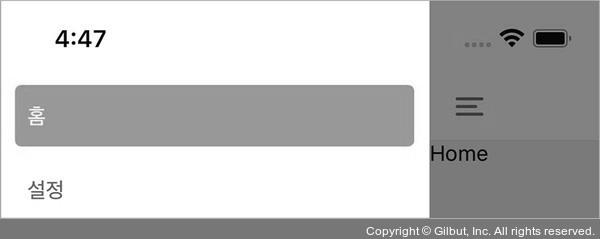
▲ 그림 5-17 드로어의 스타일 변경